Skip to content
AGROSYNAPSE
How it works

From the source document to cost per kilo, without going through Excel.

AgroSynapse brings what lives today in your system, your spreadsheets and your field equipment into one record, and charges it to the block where it happened.

How your cost is built

How your cost per block is built.

  1. 01

    It comes in on its own

    Invoices arrive from your tax authority, inventory moves with documents, labor is recorded from a phone, and GPS units and sensors send their readings.

  2. 02

    It is charged to the block

    Every expense lands on the block and cost center where it happened. Anything not yet classified is shown separately.

  3. 03

    It opens down to the document

    From cost per kilo you reach the invoice, labor record or tractor pass behind it, and see who changed what.

Your country’s documents

CountryTax documentAgricultural or plant-health agencyToday
ChileDTE (SII)SAGDirect connection
BrazilNF-e (SEFAZ, Receita Federal)MAPAImport
MexicoCFDI (SAT)SENASICAImport
PeruE-invoice (SUNAT)SENASAImport
ColombiaE-invoice (DIAN)ICAImport
ArgentinaE-invoice (ARCA)SENASAImport
ChinaDigital e-invoice (数电发票, State Taxation Administration)Customs (GACC) and Ministry of AgricultureImport

The direct connection with Chile’s SII already works. In other countries, documents are imported from the file your system or tax authority provides. Spray applications, pre-harvest intervals and traceability are recorded so you can answer the plant-health agency.

What changes

What you see with AgroSynapse

01 · Cost per block

The cost of every block, during the season.

Labor, warehouse inputs, fuel and services are charged to the block where they happened. Cost per kilo is recalculated on its own, and anything not yet classified is shown separately: it is neither hidden nor lost.

  • Budget versus actual, by cost center
  • Every figure opens down to its invoice or field task
  • A closing can be frozen and exported for your partner or accountant
app.agrosynapse.tech
Cost per block: table sorted by total cost per kilo, most expensive block first
02 · Water

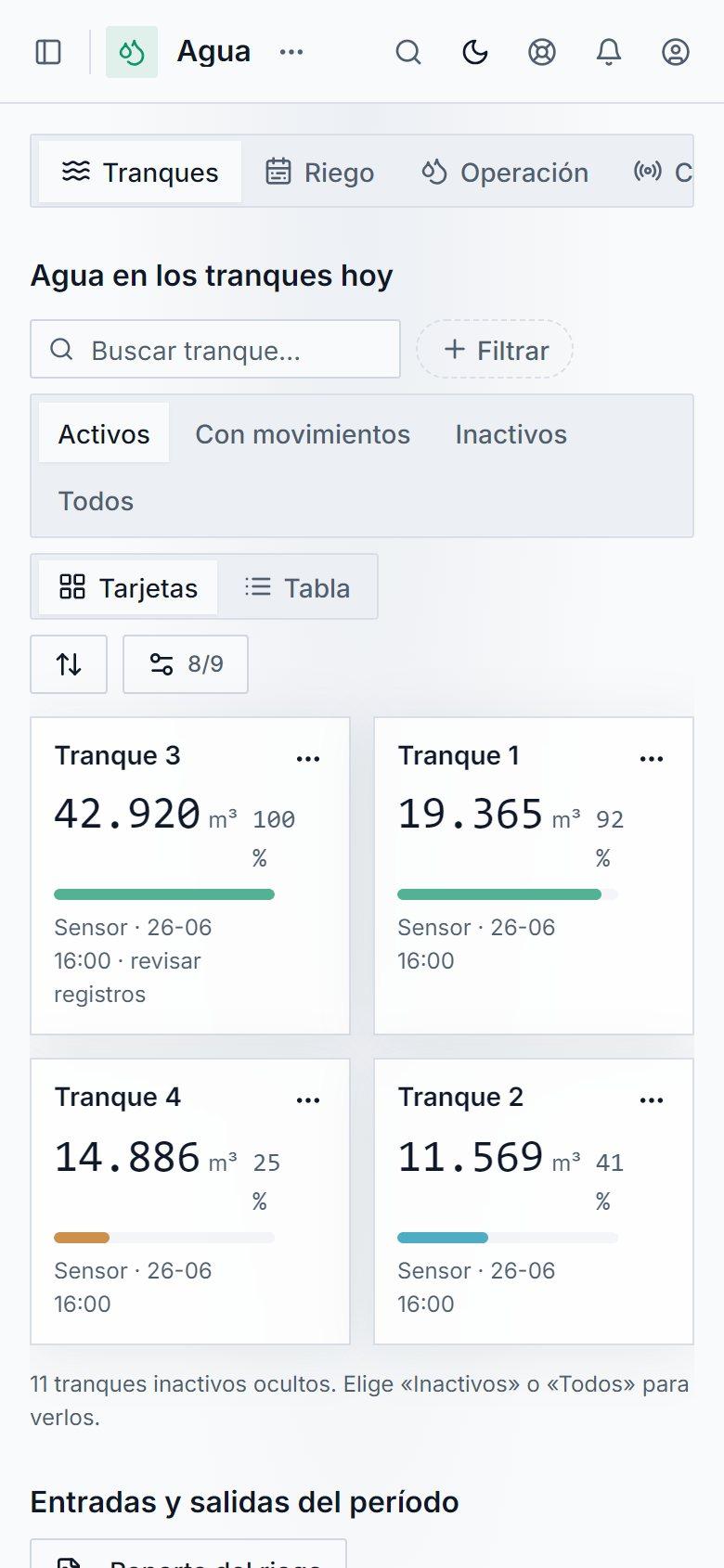
Your reservoirs, managed like a water warehouse.

How much flows in, how much goes out to irrigation and how much is left in each reservoir, with the date of the last reading. Irrigation is logged by sector from the phone, and the irrigation week reads at a glance.

  • With sensors or with manual logs
  • Inflows, outflows and transfers between reservoirs
  • Irrigation report by period
app.agrosynapse.tech
Water: volume in each reservoir today, plus inflows, outflows and transfers for the period
Water on the phone: volume and fill level of each reservoir
03 · Field work

Field work, with its crew and its block.

Every task is stored with its date, farm, block, cost center and the people who did it. That is where the tally sheet and the labor cost of each block come from, with no re-typing.

  • Piece rate and day rate per person
  • Contractors with their tasks and payment statements
  • Task rates drawn from your own history
app.agrosynapse.tech
Field work: records by date, farm, block, cost center and crew
04 · Purchasing, warehouse and fuel

Purchases that match themselves, and fuel charged to each machine.

You approve the purchase order from your phone and it reaches the supplier on its own. The invoice arrives from Chile's tax service (SII) with its line items, is matched to its PO and split by cost center; if it exceeds what was approved, it does not go in without your sign-off. Fuel moves from the tank to each machine, and the machine charges it to the cost center where it worked.

  • Inventory only moves with a document
  • Warehouse staff do not see amounts
  • Every change records who, when and the previous value

From purchase order to cost

  1. PO approved on the phone
  2. Supplier
  3. SII invoice
  4. Matched to the PO
  5. Cost center

From the tank to the block

  1. Tank
  2. Machine
  3. Cost center
AgroMind

Your data, in conversation.

AgroMind puts operational intelligence within reach of the whole team. Ask about your operation and get clear answers grounded in verifiable data within seconds.

  • Ask in natural language about tasks, costs, irrigation, inventory or traceability.
  • Clear answers over your own data, with verifiable evidence.
  • No waiting for reports and no dependency on a technical team.
AgroMind™

> Which blocks dropped yield this week?

  • query blocks
  • compare vs mean
  • read field work

  • C-12-18%
  • C-07-11%
  • C-03-7%
Integrations

Don't replace your ERP, your CRM or your platforms. Get them talking.

We connect, we don't isolate: AgroSynapse joins what you already use instead of replacing it. Invoices come in from Chile's tax service (SII), new and existing machinery report their GPS and hours, and the cost flows back to your accounting system. If a system has no API, an Excel or CSV export is enough: the Import module — included with your account at no extra cost — uses AI to map the columns to the right fields, no matter their order, name or language.

Standards the system evaluates for you
  • GlobalG.A.P.

    Calculated, not connected

    Control-point checklist calculated from your application orders — never marks compliant without evidence.

  • LMR / MRL

    Calculated, not connected

    Validates your application residues against each destination market's limits.

These aren't external connections: they're calculated automatically from the data you already record in Applications.

Using another system with an API or data export (ERP, CRM, HR, BI)? We review it with you to connect it directly during your pilot.

And if you decide to switch, we migrate your history with a reconciliation report.

Spreadsheets, an agricultural ERP, an accounting ERP or an in-house system: every record is checked against the previous system before your first closing.

How we migrate your history

Walk through the platform in a guided demo.

A 30-minute review of how you run your operation today, with the platform on screen.